In the Bash language on Linux PCs/servers, this article introduces how to disable the exclamation mark (!), which is recognized as a command or special character.
I previously wrote about escaping exclamation marks.
In simple cases, the above method works, but it results in errors when enclosed in quotes.
Case where escaping works:
xsv select '!path' -d "\t" - <<< "$( awk '{print NR "\t" $s}' <<< "$( data-music-csv | removeEmptyLines )" )" | xsv sort --select rate -N -R | xsv search --select genre "${2:-".*"}" | xsv table | shuf | tail -1 | awk 1Case where it results in an error:
id="$( xsv select '!path' -d "\t" - <<< "$( awk '{print NR "\t" $s}' <<< "$( data-music-csv | removeEmptyLines )" )" | xsv sort --select rate -N -R | xsv search --select genre "${2:-".*"}" | xsv table | shuf | tail -1 | awk 1 )"I have no idea how to escape this either, so let’s just disable it.
set +H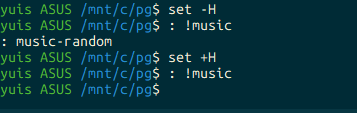
$ : !music
: music-random
$ set +H
$ : !music
$
Now the ! command can no longer be used. If you use it regularly and it’s a problem that it can’t be used, you can revert it with set -H.
As also written below, the ! is scary, isn’t it? Since commands like rm -rf . can be executed with !r, it’s too dangerous.
quoting - Can’t use exclamation mark (!) in bash? - Unix & Linux Stack Exchange