As Heroku’s free plan is ending, I want to share my thoughts and insights on alternative free and paid services. I’ll cover Github pages, VPS, AWS/PaaS, and home servers.
Just a moment ago, I received the following email from Heroku:
Important Information About Heroku Free Products Thank you for being a Heroku user. Starting November 28, 2022, free Heroku Dynos, free Heroku Postgres, and free Heroku Data for Redis® will no longer be available ... [Heroku's Next Chapter | Heroku](https://blog.heroku.com/next-chapter)
To Heroku users: Starting at the end of November 2022, free dynos, postgres databases, Redis, etc. will no longer be available.I haven't used Heroku for a long time, but about 5 years ago when I was writing Rails, I used to deploy to Heroku. That said, I still have some dynos receiving access, so there is the issue of needing to migrate them. ## Github pages (Free) The first migration candidate is Github pages.
GitHub Pages is a free service that can host static files on a GitHub URL. You can use it if you have a GitHub account.
It supports SSG (Static Site Generation) deployment with Ruby’s Jekyll library, and if you’re familiar with setting up a Ruby environment and command-line operations, you should be able to start using it right away.
The advantages of Github pages are:
- Free
- Fast page loading
- Can be used immediately if you have a GitHub account
- Need to learn Ruby installation and command-line operations
- Need to learn Jekyll syntax and Markdown
- Cannot host dynamic files
- Like Heroku, could suddenly stop being free
The advantage of VPS is its high degree of freedom.
If you’re a developer, you probably have one or two computers. You set up programming environments on those computers, install IDEs, and proceed with development, but VPS is, in a word, a remote computer. Because it’s a computer, the freedom to install any software you like and do basically anything as long as it doesn’t violate public order and morals or each terms of service is appealing.
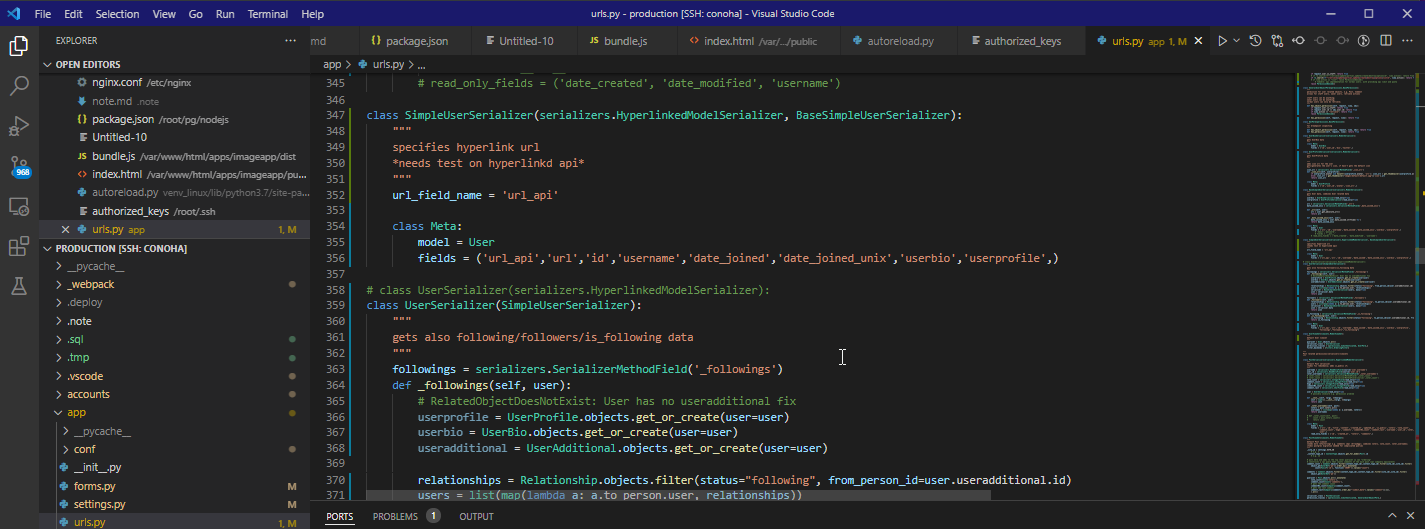
For example, you can remotely access a VPS with VSCode editor. The above shows me launching VSCode on my contracted VPS and proceeding with Django Python development.
Because VPS is flexible, within the limits of CPU and memory, you can install and configure various development software as follows:
.htaccess configuration files in Apache and nginx.conf configuration files in Nginx, or installation of Docker or VNC, or firewall configuration with iptables and security configuration with AppArmor, network construction and configuration with pfsense or WAF, introduction of IDS/IPS such as snort, intrusion detection systems, etc…
In summary, the advantages of VPS are:
- Freedom
- Can set up the deployment environment the same way you set up your own computer
- Easy to solve problems by searching online
- No issues with installation permissions
- Monthly cost
- Requires knowledge of environment setup and infrastructure
 .
.
(Note: My blog itself is running as WordPress on the rental server Xserver
 .)
.)
While the minimum infrastructure knowledge required can be a hurdle, it might be good to take it as an opportunity to learn and take on the challenge.
AWS (Paid)
Heroku is a so-called Platform-as-a-Service, “PaaS”. It’s in the same category as Microsoft Azure, Google’s GCP, or Amazon’s AWS - Amazon Web Services.
The difference between VPS and Heroku or AWS comes down to one point: freedom.
PaaS can be said to have the advantage of not having to think deeply about infrastructure such as server configuration, database configuration, environment setup, security and firewall settings.
On the other hand, that advantage can sometimes have the opposite effect depending on the person and situation. Because you can’t freely install, integrate, and set up environments like the VPS advantages mentioned above, you may feel stressed.
Or, even if environment setup and installation are not impossible, you may need to install plugins or addons for environment setup, and read documentation for their configuration.
So for example, the steps you took to install Python on your own computer can be applied directly to VPS, but with PaaS you may need to Google search for separate procedures or refer to Stack Overflow.
Whether you see this as simple and following a framework, or as lacking freedom and stressful, may be a matter of perspective.
The advantages of AWS and PaaS are:
- Not as much as VPS, but has high freedom
- Minimum security and infrastructure are guaranteed in advance
- Software that is normally complex to install can be installed with a few clicks
- Pay-as-you-go pricing
- Need to learn about each PaaS service, there's a learning curve
- Don't have complete freedom in software installation and configuration
With a home server, you basically expose your home computer to the internet, making it accessible and usable by anyone.
If you’re a web developer, you’ve probably set up some kind of web server. A server that you’ve made accessible on a LAN network, for example, at “localhost:8000” or “0.0.0.0:8000”, can also be port forwarded through NAT from WAN to an external network, making it shareable and accessible to the general public on the internet.
As far as I know, there are three main options for performing such network port forwarding.
- ngrok
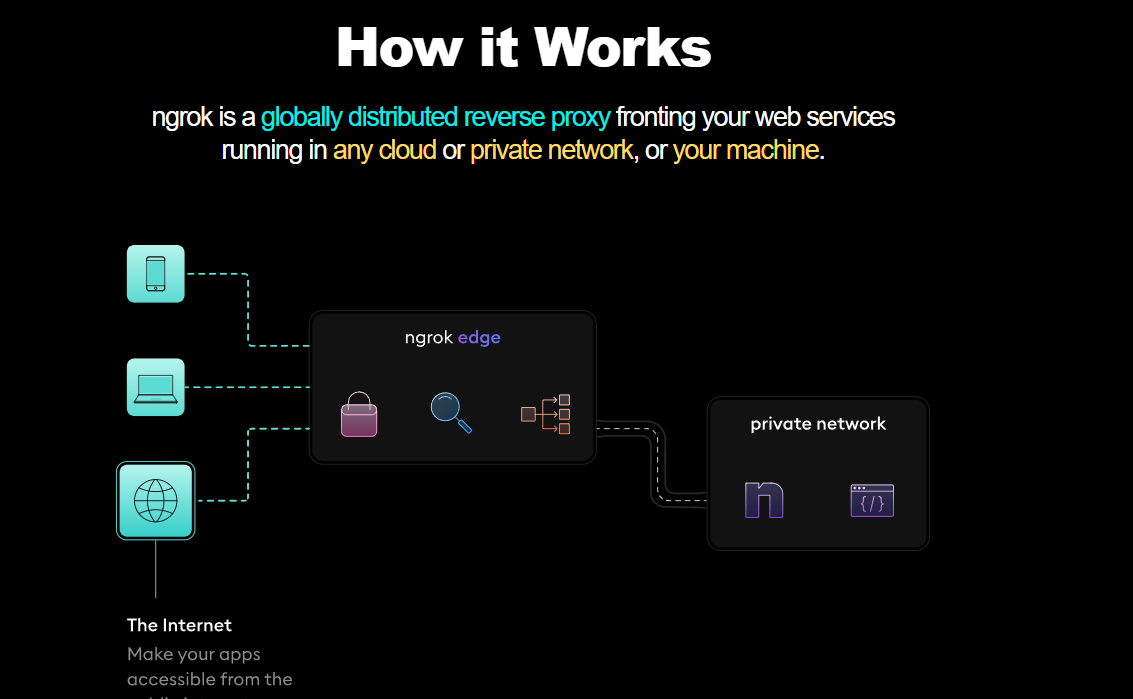
Note: I previously wrote an article about ngrok installation methods, usage, and security measures.
- WiFi router
Note: My recommended WiFi router that I use is the TP link C1200.
- frp
However, the configuration is a bit complex, and you need to also perform port forwarding via WiFi router in parallel.
Currently, I’m also using frp.
Note that depending on your Internet Service Provider, acts like a home server that exposes services externally and creates traffic load may be prohibited in the terms of service.
I use Rakuten Hikari for my fiber optic line, and I remember that their terms also stated to refrain from such usage.
Therefore, in my case, although I have built a home server, I limit it to personal use such as uploading files and photos directly to my computer from outside, editing text files on my computer, or viewing stored videos and music.
In summary, the advantages of a home server are:
- Complete freedom
- Can use high-spec computers at low cost
- Risk of being hacked if not properly set up *1
- For people with solid knowledge
- Internet line costs
- Not permitted by many ISPs in the first place