This article explains how to handle the situation when the gem path changes after installing libraries in Ruby.
After installing jruby in Ruby, the GEM path changed.
Ruby - How to change the path of the Ruby gem command (139476) | teratail
How to change the path of the Ruby gem commandI previously installed jRuby, and while the Ruby path hasn’t changed, it appears the GEM path has changed.
Because of this, gem require isn’t working properly.
I was able to install to the gem path, but I just can’t figure out how to change it.
I’ve researched and found that the GEM path is stored in variables called $GEM_PATH and $GEM_HOME, but when I checked in Powershell, there were no such variables.
Please tell me how to restore the gem path to the same path as the original Ruby.
I wanted to use sinatra. However, the gem path was set to the jruby path I configured the other day, and as a result, sinatra wasn’t installed to the Ruby that was supposed to use it, so I couldn’t require it. Perhaps bundle install and execution failures are due to the same cause. For now, I want to restore the gem command path to the original Ruby path instead of jruby.
PS C:\pg> gcm ruby | fl Path

Path : C:\Ruby24-x64\bin\ruby.exe

PS C:\pg> gcm gem | fl Path

Path : c:\jruby-9.2.0.0\bin\gem.bat
Change the priority in the environment variables so that jruby is lower than ruby.
PS C:\pg> $Env:Path.replace(';',"`r`n")
...
C:\apps\ConEmuPack.170305
C:\apps\ConEmuPack.170305\ConEmu
C:\Users\user\AppData\Local\Programs\Python\Python36-32\Scripts
C:\Users\user\AppData\Local\Programs\Python\Python36-32
C:\Ruby24-x64\bin
c:\jruby-9.2.0.0\bin
C:\Users\user\AppData\Local\Microsoft\WindowsApps
C:\Users\user\AppData\Local\atom\bin
c:\_mount_
c:\php
Now, let’s check with gcm again.
PS C:\pg> gcm ruby
CommandType Name Version Source
Application ruby.exe 2.4.2.198 C:\Ruby24-x64\bin\ruby.exe
PS C:\pg> gcm gem
CommandType Name Version Source
Application gem.cmd 0.0.0.0 C:\Ruby24-x64\bin\gem.cmd
It’s fixed!
Now the gem command can be used.
gem install sinatra
After installing:
PS C:\pg\sinatra> ruby .\app.rb
== Sinatra (v2.0.3) has taken the stage on 4567 for development with backup from Puma
*** SIGUSR2 not implemented, signal based restart unavailable!
*** SIGUSR1 not implemented, signal based restart unavailable!
*** SIGHUP not implemented, signal based logs reopening unavailable!
Puma starting in single mode...
* Version 3.11.4 (ruby 2.4.2-p198), codename: Love Song
* Min threads: 0, max threads: 16
* Environment: development
* Listening on tcp://localhost:4567
Use Ctrl-C to stop
It works! (I’m so happy)
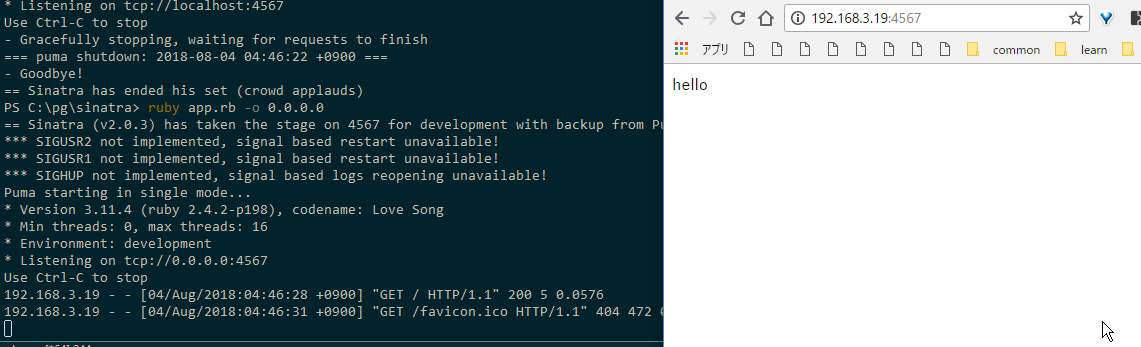
It’s working!! Great.
If you encounter any trouble after freshly installing jruby or something new on Windows, you should first consider the possibility that the gem or Ruby executable path has been overwritten.