This article introduces how to generate random text data of n characters wide by n characters tall from the Bash command line on Linux computers and servers.
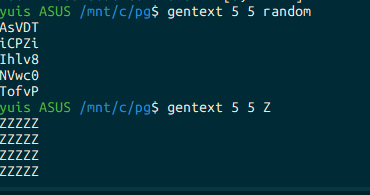
An example of generating text data composed of random characters, 5 characters x 5 characters, totaling 25 characters:
yuis ASUS /mnt/c/pg$ gentext 5 5 random
AsVDT
iCPZi
Ihlv8
NVwc0
TofvP
If random numbers are not needed, specify the third argument as blank or any character to output text data with the same character.
yuis ASUS /mnt/c/pg$ gentext 5 5
XXXXX
XXXXX
XXXXX
XXXXX
XXXXX
If you want to output the generated data to a file, pipe it as usual.
yuis ASUS /mnt/c/pg$ gentext 5 5 random > tmp.txtCode
Here’s the code:
gentext02(){
  : <<< '
  generate a large size of text contents.

  e.g. gentext02 [width] [height] [char]
  e.g. gentext02 100 100 Z
  e.g. gentext02 100 100 random > tmp.txt

  i.e. check how long time fzf takes against to a large of text contents.
    tmpdird
    push gentext02 20 50000 random > tmp.txt
    cat tmp.txt | fzf
  '

  for i in $(seq "${2:-10}") ; do
    # printf "${3:-X}%.0s" {1..${1:-10}} ; printf '\n'

      [[ "${3}" =~ rand|random ]] && {
        # printf "$( randsel {a..z} )%.0s" $( eval "echo {1..${1:-10}}" ) ; printf '\n'
        random ${1:-10}
      } || {
        printf "${3:-X}%.0s" $( eval "echo {1..${1:-10}}" ) ; printf '\n'
      }

  done

}

alias gentext="gentext02"
Code Explanation
The gentext function generates text data of n characters wide by n characters tall.
- If the second argument is not specified, 10 is specified.
for i in $(seq "${2:-10}") ; do- If the third argument is
randorrandom, therandomfunction is called.
[[ "${3}" =~ rand|random ]] && {
  random ${1:-10}
} || {
  printf

"${3:-X}%.0s" $( eval "echo {1..${1:-10}}" ) ; printf '\n'
}- Calls the
randomfunction.
random ${1:-10}- If the third argument is not specified,
Xis specified.
printf "${3:-X}%.0s" $( eval "echo {1..${1:-10}}" ) ; printf '\n'- Generates text data of n characters wide by n characters tall.
printf "${3:-X}%.0s" $( eval "echo {1..${1:-10}}" ) ; printf '\n'- Aliases the
gentextfunction asgentext02.
alias gentext="gentext02"Usage
Add this to ~/.bashrc or similar, then restart the shell or load it with source ~/.bashrc or similar.
Using the gentext command, you can generate text data of n characters wide by n characters tall.
random(){
  ARG1=${1:-32}
  # cat /dev/urandom | tr -dc 'a-zA-Z0-9' | fold -w $1 | head -n 1
  cat /dev/urandom | tr -dc 'a-zA-Z0-9' | fold -w $ARG1 | head -n 1
}