Introduces how to create cross-platform software/apps with graphical user interfaces for Windows, Mac OSX, and Linux using Ruby’s JRuby library.
I want to create a cross-platform Ruby GUI application using shoes (shoes4) on a Windows 10 environment.
Preparation
- Install Java and JDK
- Install jruby
From Downloads — JRuby.org, click and download JRuby 9.2.0.0 Windows Executable (x64).
Install it, set the path, restart PowerShell, etc., and check if jruby is installed.
jruby --version- jruby -S gem install shoes --pre
Reference: shoes/shoes4: Shoes 4 : the next version of Shoes
Tried Running It
app.rb
Shoes.app width: 300, height: 200 do
  background lime..blue

  stack do
    para "Welcome to the world of Shoes!"
    button "Click me" do alert "Nice click!" end
    image "http://shoesrb.com/img/shoes-icon.png",
          margin_top: 20, margin_left: 10
  end
end
shoes app.rbThis should open a GUI window.
Packaging
PS C:\pg\rubyGuiAppDev> shoes package --help
Usage: shoes-swt [options]
        --jar                        Package as executable JAR file
        --mac                        Package as OS X application
        --windows                    Package as Windows application
        --linux                      Package as Linux application
Oops, error…
PS C:\pg\rubyGuiAppDev\_> shoes package --windows .\app.rb
Packaging windows...
rm -f pkg/tmp/app.jar
Creating pkg/tmp/app.jar
ArgumentError: same file: pkg/tmp/windows-app-template/app.bat and pkg/tmp/windows-app-template/app.bat
  block in fu_each_src_dest at C:/jruby-9.2.0.0/lib/ruby/stdlib/fileutils.rb:1557
          fu_each_src_dest0 at C:/jruby-9.2.0.0/lib/ruby/stdlib/fileutils.rb:1574
           fu_each_src_dest at C:/jruby-9.2.0.0/lib/ruby/stdlib/fileutils.rb:1556
                         mv at C:/jruby-9.2.0.0/lib/ruby/stdlib/fileutils.rb:516
                after_built at C:/jruby-9.2.0.0/lib/ruby/gems/shared/gems/furoshiki-0.6.1/lib/furoshiki/windows_app.rb:34
                    package at C:/jruby-9.2.0.0/lib/ruby/gems/shared/gems/furoshiki-0.6.1/lib/furoshiki/base_app.rb:41
               block in run at C:/jruby-9.2.0.0/lib/ruby/gems/shared/gems/shoes-swt-4.0.0.rc1/lib/shoes/swt/packager.rb:52
                       each at org/jruby/RubyArray.java:1801
                        run at C:/jruby-9.2.0.0/lib/ruby/gems/shared/gems/shoes-swt-4.0.0.rc1/lib/shoes/swt/packager.rb:49
                        run at C:/jruby-9.2.0.0/lib/ruby/gems/shared/gems/shoes-core-4.0.0.rc1/lib/shoes/packager.rb:24
                        run at C:/jruby-9.2.0.0/lib/ruby/gems/shared/gems/shoes-core-4.0.0.rc1/lib/shoes/ui/cli/package_command.rb:14
                        run at C:/jruby-9.2.0.0/lib/ruby/gems/shared/gems/shoes-core-4.0.0.rc1/lib/shoes/ui/cli.rb:40
                     <main> at C:/jruby-9.2.0.0/lib/ruby/gems/shared/gems/shoes-swt-4.0.0.rc1/bin/shoes-swt:37
                       load at org/jruby/RubyKernel.java:994
It says there are files with the same name, so change the name.
app > firstapp
PS C:\pg\rubyGuiAppDev\_> shoes package --windows .\firstapp.rb
Packaging windows...
rm -f pkg/tmp/firstapp.jar
Creating pkg/tmp/firstapp.jar
Done.
Extract the created firstapp-windows.zip and run the .jar file inside to open the GUI.
Reference
Once you’ve confirmed this far, let’s take a look at the Rdoc.
Top Level Namespace — Documentation for shoes/shoes4 (master)
Debugging Method
I’m curious about the ask_open_file method, but does it save the contents of the opened file to an object? How do you retrieve it?
Since I’m touching Java and Jruby for the first time (although I’ve touched Java a little), I don’t understand the IO part on the Windows side.
At times like this, I wish I could debug with pry…
The development group in Shoe's Gemfile has pry and pry-nav installed, which should give a solid, basic debugging experience when necessary.[Development and Debugging Tools · shoes/shoes4 Wiki](https://github.com/shoes/shoes4/wiki/Development-and-Debugging-Tools)
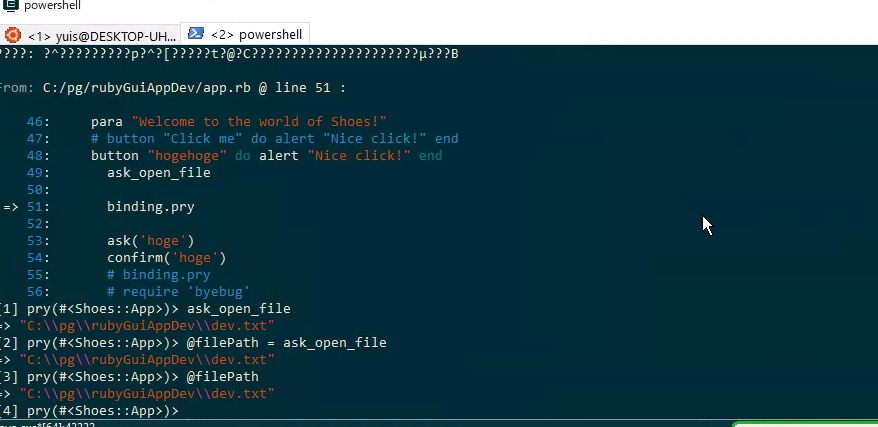
Done. ask_open_file seems to return the absolute path of the selected file.
How to do it:
- Install:
jruby -S gem install pry - Add where you want to start debugging
require "pry"
binding.pry
It says pry is in the Gemfile and you can use it right away, but you can’t use it without installing it. I don’t really understand. Well, you can install it, so it’s ok.
When you want to quit, use quit, and you can see help with help.
The pry I know uses continue, but I wonder if pry and pry-byebug are different. I don’t really understand.
By the way, pry-byebug cannot be installed or required. When you jruby -S gem install pry-byebug, you get a make error ERROR: Failed to build gem native extension.. I guess it means don’t use it.
The reassurance of pry.
Starting Debug from GUI
Make pry start when you press a button.
button do |b|
    b.text = 'pry'
    if b.enabled?
        binding.pry
    end
end
Pressing Button Sends Text Box Value to Ruby
The edit_box method is executed every time you enter text, and @edit_box_text is rewritten. When you press the send button, it puts @edit_box_text.
edit_box do |e|
  @edit_box_text = e.text
end

button "send" do |b|
puts @edit_box_text
end
There are also methods that call classes like inputBox.
Reference:
shoes4/element.rb at d16159b94ae8190059e1d596332da1ad9346b0a7 · shoes/shoes4