This article introduces how to get the current system volume using the C# programming language on Windows PCs.
We’ll get the volume of sound playing in real-time with C#.
I worked with C# for the first time in about 3 years. It’s almost like doing C# for the first time, so this article will be like a C# introduction/tutorial. If you only want to know about the main content about system volume, feel free to skip ahead.
Loading External DLL Modules with csc.exe
To get the current system volume, we use a module called NAudio.dll.
If you try to compile without loading the dll module, you’ll get an error CS0246 error.
How do you load a dll? You can specify the path to the file with the /r option in csc.exe and it will load it automatically.
C:\Users\Noob\csharp>csc test.cs /r:SnarlNetwork.dll
c# - Why am I getting error CS0246: The type or namespace name could not be found? - Stack Overflow
You can see help with csc /help, so let’s check what /r is.
It says /reference:<file list> Reference metadata from the specified assembly files.
PS C:\pg> csc.exe /help | sls "/r"

 /refout:<file>                Generate reference assembly output
 /recurse:<wildcard>           Follow wildcards in current directory and
 /reference:<alias>=<file>     Reference metadata from the specified
                                assembly file using the specified alias (Short form: /r)
 /reference:<file list>        Reference metadata from the specified
                                assembly files (Short form: /r)
 /resource:<resinfo>           Embed the specified resource (Short form: /res)
 /refonly                      Generate reference assembly instead of main output
 /ruleset:<file>               Ruleset file to disable specific diagnostics
 /reportanalyzer               Report additional analyzer information
I did some trial-and-error testing, so please use it as a reference.
cp '/mnt/c/Program Files/BlueStacks/NAudio.dll' .

'/mnt/c/Program Files (x86)/Microsoft Visual Studio/2017/Community/MSBuild/15.0/Bin/Roslyn/csc.exe' dev-cs.cs NAudio.dll
# => error

'/mnt/c/Program Files (x86)/Microsoft Visual Studio/2017/Community/MSBuild/15.0/Bin/Roslyn/csc.exe' dev-cs.cs "C:/Program Files/BlueStacks/NAudio.dll"
# => error

'/mnt/c/Program Files (x86)/Microsoft Visual Studio/2017/Community/MSBuild/15.0/Bin/Roslyn/csc.exe' dev-cs.cs /r:NAudio.dll
# => success

'/mnt/c/Program Files (x86)/Microsoft Visual Studio/2017/Community/MSBuild/15.0/Bin/Roslyn/csc.exe' dev-cs.cs /r:./NAudio.dll
# => success

'/mnt/c/Program Files (x86)/Microsoft Visual Studio/2017/Community/MSBuild/15.0/Bin/Roslyn/csc.exe' dev-cs.cs /r:"C:/Program Files/BlueStacks/NAudio.dll"
# => success

'/mnt/c/Program Files (x86)/Microsoft Visual Studio/2017/Community/MSBuild/15.0/Bin/Roslyn/csc.exe' dev-cs.cs /r:"C:\Program Files\BlueStacks\NAudio.dll"
# => success
As shown above, the path can be either absolute or relative. Before checking help, I thought the r in /r stood for relative.
c# - Can I load a .NET assembly at runtime and instantiate a type knowing only the name? - Stack Overflow reflection - Loading DLLs at runtime in C# - Stack Overflow
Getting the Current System Volume
Create a file as follows and run it with a command.
'/mnt/c/Program Files (x86)/Microsoft Visual Studio/2017/Community/MSBuild/15.0/Bin/Roslyn/csc.exe' dev-cs.cs /r:"C:\Program Files\BlueStacks\NAudio.dll" ; ./dev-cs.exedev-cs.cs
using NAudio.CoreAudioApi;
// using System.Console;
using System;

namespace Dev
{
  public static class Program
  {
    public static void Main(params string[] args)
    {
      // System.Console.WriteLine("Hello !!");

      MMDeviceEnumerator devEnum = new MMDeviceEnumerator();
      MMDevice defaultDevice = devEnum.GetDefaultAudioEndpoint(DataFlow.Render, Role.Multimedia);

      Console.WriteLine( "The realtime volume is " + defaultDevice.AudioMeterInformation.MasterPeakValue.ToString() );

    }
  }
}
audio - Get Master Sound Volume in c# - Stack Overflow
You’ll get output like the following:
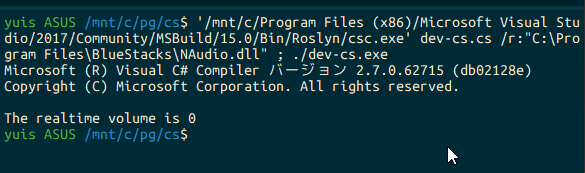
yuis ASUS /mnt/c/pg/cs$ '/mnt/c/Program Files (x86)/Microsoft Visual Studio/2017/Community/MSBuild/15.0/Bin/Roslyn/csc.exe' dev-cs.cs /r:"C:\Program Files\BlueStacks\NAudio.dll" ; ./dev-cs.exe
Microsoft (R) Visual C# Compiler version 2.7.0.62715 (db02128e)
Copyright (C) Microsoft Corporation. All rights reserved.

The realtime volume is 0
If you play music or something, this value will fluctuate.
Conclusion

It was relatively easy to implement. I was able to get this far in 2 hours of work, so I think it went fairly smoothly. When I have time, I’d like to occasionally work with C# while looking at awesome.
quozd/awesome-dotnet: A collection of awesome .NET libraries, tools, frameworks and software