<>
In Python and programming languages,
Let’s install pyenv on Ubuntu 16.04 to enable Python version management. It can be done similarly on Ubuntu 18.04 and WSL.
Install it:
git clone https://github.com/pyenv/pyenv.git ~/.pyenvAdd to ~/.bashrc:
export PYENV_ROOT="$HOME/.pyenv"
export PATH="$PYENV_ROOT/bin:$PATH"

if command -v pyenv 1>/dev/null 2>&1; then
  eval "$(pyenv init -)"
fi
Here’s a note: As follows, if echo $BASH_ENV outputs ~/.bashrc, it seems better not to add the above code to /.bashrc. Instead, add it to /.bash_profile.
In my environment, I haven’t created ~/.bash_profile, and BASH_ENV is also undefined, so I ignored it and added it to .bashrc and use it, but I haven’t had any problems.
General warning: There are some systems where the BASH_ENV variable is configured to point to .bashrc. On such systems you should almost certainly put the abovementioned line eval ”$(pyenv init -)” into .bash_profile, and not into .bashrc. Otherwise you may observe strange behaviour, such as pyenv getting into an infinite loop.
Restart:
bashAs follows, before installing Python with pyenv, it says to install dependency programs.
Install Python build dependencies before attempting to install a new Python version.
Those who already have a Python environment should be fine, but those who haven’t installed Python itself should install these. I haven’t actually verified it, but I think running roughly the following code should be fine.
sudo apt-get install -y python3-pip python3-dev # for Python 3.n
pip3 install --upgrade pip
You can install any version of Python as follows:

pyenv install 3.6.7
pyenv install 2.7.12
Specify the Python version to use with pyenv global. This automatically overrides the python and python3 commands with pyenv.
$ pyenv global 2.7.12 3.6.7
$ pyenv versions
  system
* 2.7.12 (set by /Users/yyuu/.pyenv/version)
* 3.6.7 (set by /Users/yyuu/.pyenv/version)
$ python --version
Python 2.7.12
$ python2.7 --version
Python 2.7.12
$ python3.6 --version
Python 3.6.7
Commands that were failing before changing versions with pyenv…
$ python3 --version
Python 3.5.2

$ epy 'regex_match("hoge","hoge")'
  File "/mnt/c/pg/epy.py", line 28
    if ( re.match(rf"{regex}", text, re.M) ) : return True
                            ^
SyntaxError: invalid syntax
Now succeed without errors.
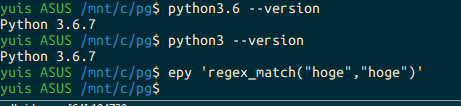
$ python3.6 --version
Python 3.6.7
$ python3 --version
Python 3.6.7
$ epy 'regex_match("hoge","hoge")'
$