Implement tag functionality using the Ruby on Rails plugin acts-as-taggable-on.
What you can do with acts-as-taggable-on
- Tag list page
- Individual tag pages; display model information tagged with tag A (hard to explain)
- Tag search (OR search/AND search/minus search etc) (can be combined with other search mechanisms using set operations)
- **Add/delete multiple tags; can batch add or edit tags for each model instance**. Think of Niconico Douga's tag editing.
commands
bundle install rake acts_as_taggable_on_engine:install:migrations rake db:migrate
Edit controller and model
```ruby
class User < ActiveRecord::Base
  acts_as_taggable # Alias for acts_as_taggable_on :tags
  acts_as_taggable_on :skills, :interests
end

class UsersController < ApplicationController
  def user_params
    params.require(:user).permit(:name, :tag_list) ## Rails 4 strong params usage
  end
end
Mysql seems to need a bit more configuration but I’ll omit it.
Verify with rails c.
@user = User.new(:name => "Bobby")
@user.tag_list.add("awesome")   # add a single tag. alias for <<
@user.tag_list.remove("awesome") # remove a single tag
@user.save # save to persist tag_list
Specific example
@hashmodel = Hashmodel.find(1)
@hashmodel.tag_list = "hoge,fuga"
@hashmodel.save
Hashmodel.find(1).tag_list #=> ["hoge", "fuga"]
Hashmodel.find(6).tag_list #=> ["foo", "fuga"]

Hashmodel.tagged_with("fuga").by_join_date.ids
You can also define multiple tags as a comma-separated string like “hoge,fuga”.
If you want to use | etc. instead of commas, you can also define the delimiter.
Finding Tagged Objects
Methods that might be useful for implementing search functionality, etc.
The official reference says scope :by_join_date, order(“created_at DESC”), but this is notation for an old version of ActiveRecord and doesn’t work.
Correctly written, it becomes scope :by_join_date , -> {order(created_at: :DESC)}. Please refer to this.
# Returns objects from User model containing tag "awesome"
User.tagged_with("awesome").by_join_date

# e.g. Hashmodel.tagged_with("fuga")[0].id
# => 1
# Hashmodel.tagged_with("fuga,hoge")[0].id
# Comma-separated strings are OK, not just arrays

# Returns objects containing all tags (AND search)
User.tagged_with(["awesome", "cool"], :match_all => true)

# If at least one matches (OR search)
User.tagged_with(["awesome", "cool"], :any => true)

# Exclusion; does not contain tags
User.tagged_with(["awesome", "cool"], :exclude => true)
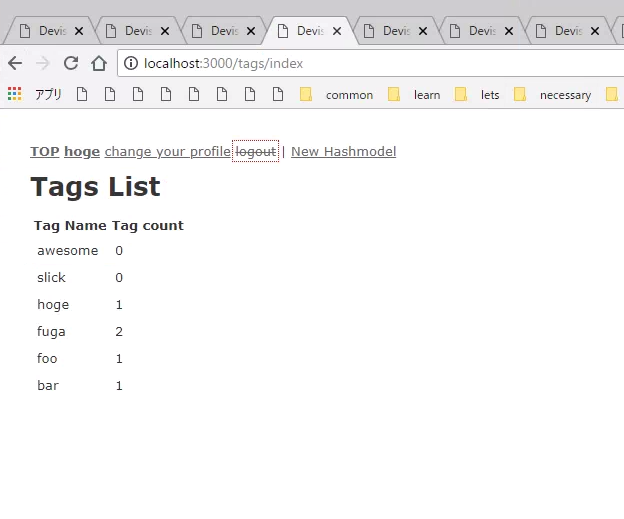
Implementing tag list and individual tag pages
Generate and configure controller
rails g controller tags index showclass TagsController < ApplicationController
def index
@tags = ActsAsTaggableOn::Tag.all
end
def show
@tag = ActsAsTaggableOn::Tag.find(params[:id])
@posts = Hashmodel.tagged_with(@tag.name)
end
end
As you can see, ActsAsTaggableOn::Tag is the model.
- VIEW example
| Tag Name | Tag count |
|---|---|
| <%= tag.name %> | <%= tag.taggings_count %> |
app\views\tags\show.html.erb
```erb
<h1>Tag::<%= @tag.name %></h1>
<ul>
<% @posts.each do |post| %>
  <li><%= post.title %></li>
<% end %>
</ul>
References:
mbleigh/acts-as-taggable-on: A tagging plugin for Rails applications that allows for custom tagging along dynamic contexts. Tutorial for Posts · mbleigh/acts-as-taggable-on Wiki
These two should be enough.
Implementation of search functionality will come later.