In the Bash programming language on Linux computers/servers, this article introduces how to remove the / (slash) when the last character is /.
There are cases where you want to remove the last ”/”. For example, when using cp or rsync, specifying a directory + * (wildcard) has significant meaning rather than just specifying a directory.
{/* path/to/としたいのに、
path/to//となってしまう、 */}
You can avoid situations where you want path/to/* but it becomes path/to//*.
func(){

    [[ "$( echo "${1}" | getlastchar )" == "/" ]] && var="$( echo ${1} | chomplastchar )" || var="${1}"

    echo ${var}

}

chomplastchar(){
  chomp | python3 -c "import json,sys;print(sys.stdin.read()[:-1])"
}

getlastchar(){
  chomp | python3 -c "import json,sys;print(sys.stdin.read()[-1:])"
}

chomp ()
{
    perl -pe "chomp"
}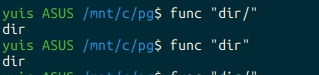
yuis ASUS /mnt/c/pg$ func "dir/"
dir
yuis ASUS /mnt/c/pg$ func "dir"
dir