This article introduces how to use reveal.js in the JavaScript programming language, including how to create slides in HTML with sample programs.
About reveal.js:
hakimel/reveal.js: The HTML Presentation Framework
Simple reveal.js installation:
git clone https://github.com/hakimel/reveal.js.git ; cd reveal.js ; npm install ;
npm start -- --port=8001
With this, there’s an index.html file in the reveal.js directory that was cloned with git, and you can confirm it works by viewing it in a browser.
Then, in the same directory, place a file like english.html, paste the following HTML, and you’ve created an original flashcard!
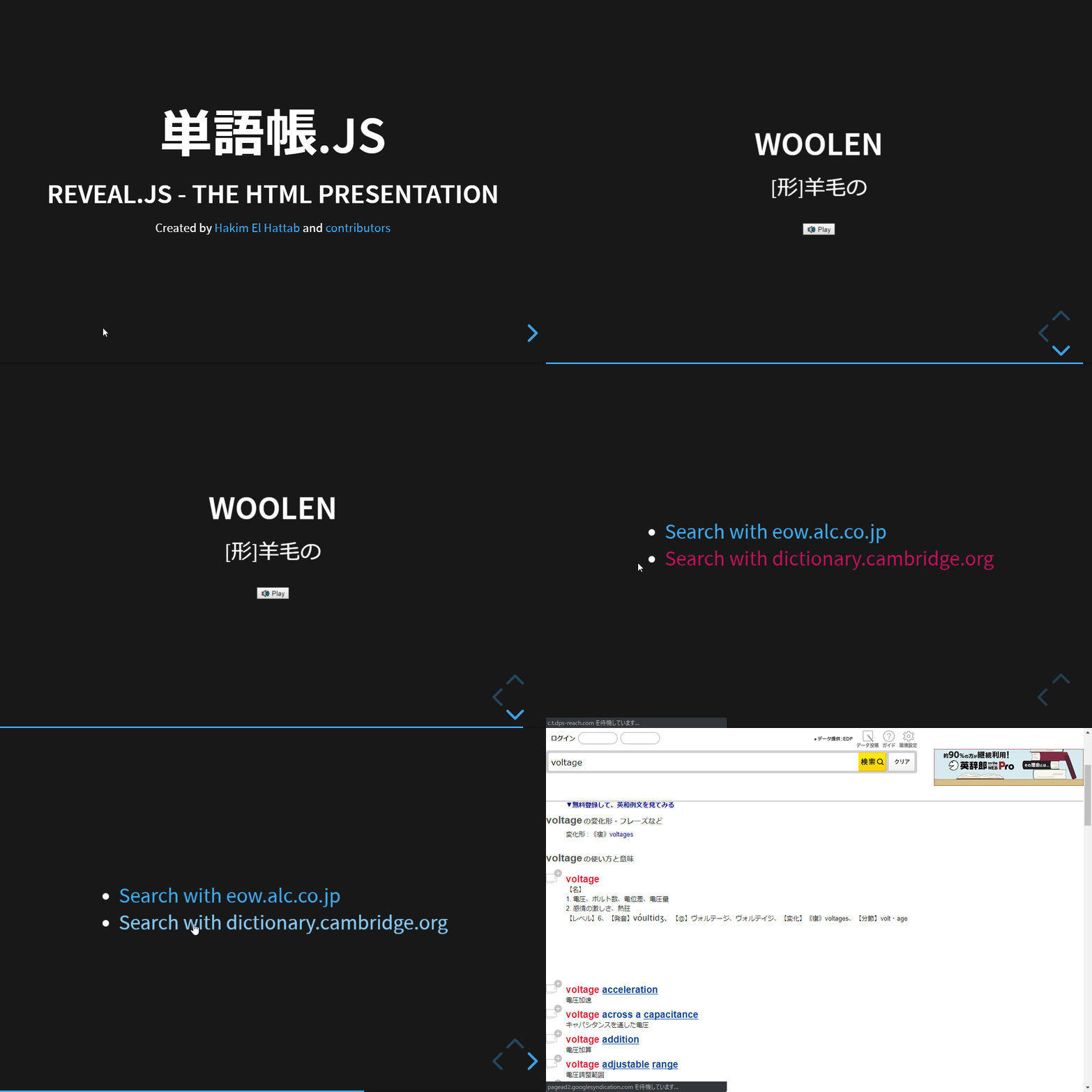
I’ve prepared a demo.
Flashcard.JS - reveal.js – The HTML Presentation Framework Framework
You can create flashcards like the above by writing words based on the following sample HTML.
Sample HTML:
<!doctype html>
<html lang="en">

    <head>
        <meta charset="utf-8">

        <title>Flashcard.JS - reveal.js – The HTML Presentation Framework Framework</title>

        <meta name="description" content="A framework for easily creating beautiful presentations using HTML">
        <meta name="author" content="Hakim El Hattab">

        <meta name="apple-mobile-web-app-capable" content="yes">
        <meta name="apple-mobile-web-app-status-bar-style" content="black-translucent">

        <meta name="viewport" content="width=device-width, initial-scale=1.0">

        <link rel="stylesheet" href="css/reset.css">
        <link rel="stylesheet" href="css/reveal.css">
        <link rel="stylesheet" href="css/theme/black.css" id="theme">

        <!-- Theme used for syntax highlighting of code -->
        <link rel="stylesheet" href="lib/css/monokai.css">

        <!-- Printing and PDF exports -->
        <script>
            var link = document.createElement( 'link' );
            link.rel = 'stylesheet';
            link.type = 'text/css';
            link.href = window.location.search.match( /print-pdf/gi ) ? 'css/print/pdf.css' : 'css/print/paper.css';
            document.getElementsByTagName( 'head' )[0].appendChild( link );
        </script>

    <script src='https://code.responsivevoice.org/responsivevoice.js'></script>

        <!--[if lt IE 9]>
        <script src="lib/js/html5shiv.js"></script>
        <![endif]-->
    </head>

    <body>

        <div class="reveal">

            <!-- Any section element inside of this container is displayed as a slide -->
            <div class="slides">
                <section>
                    # Flashcard.js
                    ### Reveal.js - The HTML Presentation
                    <p>
                        <small>Created by [Hakim El Hattab](http://hakim.se) and [contributors](https://github.com/hakimel/reveal.js/graphs/contributors)</small>
                    </p>
                </section>

        <section>
                <section id="fragments">
                    ## wrongly
                    <p class="fragment fade-down">[adv] illegally</p>
            <input onclick="responsiveVoice.speak('wrongly');" type='button' value='🔊 Play' />
                </section>
                <section id="">
            <ul>
              <li>                <a href='https://eow.alc.co.jp/search?q=wrongly'>Search with eow.alc.co.jp</a>              </li>
              <li>                <a href='https://dictionary.cambridge.org/dictionary/english/wrongly'>Search with dictionary.cambridge.org</a>              </li>
            </ul>
                </section>
                </section>

        <section>
                <section id="fragments">
                    ## voltage
                    <p class="fragment fade-down">[noun] voltage</p>
            <input onclick="responsiveVoice.speak('voltage');" type='button' value='🔊 Play' />
                </section>
                <section id="">
            <ul>
              <li>                <a href='https://eow.alc.co.jp/search?q=voltage'>Search with eow.alc.co.jp</a>              </li>
              <li>                <a href='https://dictionary.cambridge.org/dictionary/english/voltage'>Search with dictionary.cambridge.org</a>              </li>
            </ul>
                </section>
                </section>

        <section>
                <section id="fragments">
                    ## woolen
                    <p class="fragment fade-down">[adj] made of wool</p>
            <input onclick="responsiveVoice.speak('woolen');" type='button' value='🔊 Play' />
                </section>
                <section id="">
            <ul>
              <li>                <a href='https://eow.alc.co.jp/search?q=woolen'>Search with eow.alc.co.jp</a>              </li>
              <li>                <a href='https://dictionary.cambridge.org/dictionary/english/woolen'>Search with dictionary.cambridge.org</a>              </li>
            </ul>
                </section>
                </section>

            </div>

        </div>

        <script src="js/reveal.js"></script>

        <script>

            // More info https://github.com/hakimel/reveal.js#configuration
            Reveal.initialize({
                controls: true,
                progress: true,
                center: true,
                hash: true,

                transition: 'slide', // none/fade/slide/convex/concave/zoom

                // More info https://github.com/hakimel/reveal.js#dependencies
                dependencies: [
                    { src: 'plugin/markdown/marked.js', condition: function() { return !!document.querySelector( '[data-markdown]' ); } },
                    { src: 'plugin/markdown/markdown.js', condition: function() { return !!document.querySelector( '[data-markdown]' ); } },
                    { src: 'plugin/highlight/highlight.js', async: true },
                    { src: 'plugin/search/search.js', async: true },
                    { src: 'plugin/zoom-js/zoom.js', async: true },
                    { src: 'plugin/notes/notes.js', async: true }
                ]
            });

        </script>

    </body>
</html>
The following is the part that repeats words. If you want to change it to your own, modify the following:
        <section>
                <section id="fragments">
                    ## wrongly
                    <p class="fragment fade-down">[adv] illegally</p>
            <input onclick="responsiveVoice.speak('wrongly');" type='button' value='🔊 Play' />
                </section>
                <section id="">
            <ul>
              <li>                <a href='https://eow.alc.co.jp/search?q=wrongly'>Search with eow.alc.co.jp</a>              </li>
              <li>                <a href='https://dictionary.cambridge.org/dictionary/english/wrongly'>Search with dictionary.cambridge.org</a>              </li>
            </ul>
                </section>
                </section>

        <section>
                <section id="fragments">
                    ## voltage
                    <p class="fragment fade-down">[noun] voltage</p>
            <input onclick="responsiveVoice.speak('voltage');" type='button' value='🔊 Play' />
                </section>
                <section id="">
            <ul>
              <li>                <a href='https://eow.alc.co.jp/search?q=voltage'>Search with eow.alc.co.jp</a>              </li>
              <li>                <a href='https://dictionary.cambridge.org/dictionary/english/voltage'>Search with dictionary.cambridge.org</a>              </li>
            </ul>
                </section>
                </section>

        <section>
                <section id="fragments">
                    ## woolen
                    <p class="fragment fade-down">[adj] made of wool</p>
            <input onclick="responsiveVoice.speak('woolen');" type='button' value='🔊 Play' />
                </section>
                <section id="">
            <ul>
              <li>                <a href='https://eow.alc.co.jp/search?q=woolen'>Search with eow.alc.co.jp</a>              </li>
              <li>                <a href='https://dictionary.cambridge.org/dictionary/english/woolen'>Search with dictionary.cambridge.org</a>              </li>
            </ul>
                </section>
                </section>
Bonus
Here’s a simple bash script that I actually use for batch processing from a word list to URL publishing for reference. There are some unexplained parts, so please figure them out from the code.
I’m generating the repeating HTML parts with Handlebars.js, adding them to HTML, and deploying with rsync.
The data-english-vocab command is complex - about 500 lines - so I can’t introduce it, but simply put, it’s scraping the parts of my note files where English words are written. I manage notes and memos in several files. The format of English words to scrape is [word] [meaning]. Two spaces or tab separated. e.g. english English as one line.
Currently there are about 5000 lines of these, and I’m extracting 100 lines from them and deploying as vocabulary flashcard HTML.
Honestly, this has no use for anyone other than me, but it’s here as a batch processing reference.
vocabshare02(){

  : <<<'
  # note

  cd /home/data/_tmp/20190524000727/reveal.js && npm start -- --port=8081

  http://:8081/english.html#/
  '

cd=$PWD

cd /mnt/c/pg/node

> /mnt/c/pg/node/tmp.js

cat << 'EOT' >> /mnt/c/pg/node/tmp.js

Handlebars = require('handlebars');

var source = `

{{test node}}

`;

Handlebars.registerHelper('test', function(data) {

  var str ;
  var array = ["layer one","layer two","layer three"] ;
  for (var i = 0; i < data.length; i++ ) {

    str += `
    <section>
      <section id="fragments">
        ## ${data[i]["term"]}
        <p class="fragment fade-down">${data[i]["meaning"]}</p>
        <input onclick="responsiveVoice.speak('${data[i]["term"]}');" type='button' value='🔊 Play' />
      </section>
      <section id="">
        <ul>
          <li>                <a href='https://eow.alc.co.jp/search?q=${data[i]["term"]}'>Search with eow.alc.co.jp</a>              </li>
          <li>                <a href='https://dictionary.cambridge.org/dictionary/english/${data[i]["term"]}'>Search with dictionary.cambridge.org</a>              </li>
        </ul>
      </section>
    </section>
    `;

  };

  return new Handlebars.SafeString (str);
});

var template = Handlebars.compile(source);

var data = {

  node: [

EOT

# Mainly change here
# data-english-vocab  | head -200 | awk '/.+\s\s.*/' | sed -Ee 's/(.+?)\s\s(.*)/{ term: "\1", meaning: "\2" } ,/g' >> /mnt/c/pg/node/tmp.js
  # issue:: .*? not work
  # data-english-vocab  | tail -200 | awk '/.+(\s\s|\t).*/' | sed -Ee 's/(.*)(\s\s|\t)(.*)/{ term: "\1", meaning: "\3" } ,/g' >> /mnt/c/pg/node/tmp.js
    data-english-vocab | awk '/.+(\s\s|\t).*/' | head -100 | sed -Ee 's/(.*)(\s\s|\t)(.*)/{ term: "\1", meaning: "\3" } ,/g' >> /mnt/c/pg/node/tmp.js

cat << 'EOT' >> /mnt/c/pg/node/tmp.js

    // e.g.
    // { term: "insult", meaning: "侮辱" } ,
    // { term: "cruel", meaning: "残酷な" } ,
    // { term: "disturb", meaning: "妨害する" } ,

  ] ,

};

var result = template(data);

console.log(result) ;

const fs = require('fs');
fs.writeFile("./tmp.txt", result , function(err) {
    if(err) {
        return console.log(err);
    }
});

EOT

# var="$( nodejs /mnt/c/pg/node/tmp.js | sed -Ee 's/undefined//' )"
nodejs /mnt/c/pg/node/tmp.js | sed -Ee 's/undefined//' > ~/tmp.txt

tmpdird

> tmp.txt

cat << 'EOT' >> tmp.txt

<!doctype html>
<html lang="en">

    <head>
        <meta charset="utf-8">

        <title>Flashcard.JS - reveal.js – The HTML Presentation Framework Framework</title>

        <meta name="description" content="A framework for easily creating beautiful presentations using HTML">
        <meta name="author" content="Hakim El Hattab">

        <meta name="apple-mobile-web-app-capable" content="yes">
        <meta name="apple-mobile-web-app-status-bar-style" content="black-translucent">

        <meta name="viewport" content="width=device-width, initial-scale=1.0">

        <link rel="stylesheet" href="css/reset.css">
        <link rel="stylesheet" href="css/reveal.css">
        <link rel="stylesheet" href="css/theme/black.css" id="theme">

        <!-- Theme used for syntax highlighting of code -->
        <link rel="stylesheet" href="lib/css/monokai.css">

        <!-- Printing and PDF exports -->
        <script>
            var link = document.createElement( 'link' );
            link.rel = 'stylesheet';
            link.type = 'text/css';
            link.href = window.location.search.match( /print-pdf/gi ) ? 'css/print/pdf.css' : 'css/print/paper.css';
            document.getElementsByTagName( 'head' )[0].appendChild( link );
        </script>

    <script src='https://code.responsivevoice.org/responsivevoice.js'></script>

        <!--[if lt IE 9]>
        <script src="lib/js/html5shiv.js"></script>
        <![endif]-->
    </head>

    <body>

        <div class="reveal">

            <!-- Any section element inside of this container is displayed as a slide -->
            <div class="slides">
                <section>
                    # Flashcard.js
                    ### Reveal.js - The HTML Presentation

                        <small>Created by [Hakim El Hattab](http://hakim.se) and [contributors](https://github.com/hakimel/reveal.js/graphs/contributors)</small>

                </section>

        <!-- e.g.

        <section>
                <section id="fragments">
                    ## woolen
                    <p class="fragment fade-down">[adj] made of wool</p>
            <input onclick="responsiveVoice.speak('woolen');" type='button' value='🔊 Play' />
                </section>
                <section id="">
            <ul>
              <li>                <a href='https://eow.alc.co.jp/search?q=woolen'>Search with eow.alc.co.jp</a>              </li>
              <li>                <a href='https://dictionary.cambridge.org/dictionary/english/woolen'>Search with dictionary.cambridge.org</a>              </li>
            </ul>
                </section>
                </section>

        -->

EOT

# echo $var >> tmp.txt
cat ~/tmp.txt >> tmp.txt

cat << 'EOT' >> tmp.txt

            </div>

        </div>

        <script src="js/reveal.js"></script>

        <script>

            // More info https://github.com/hakimel/reveal.js#configuration
            Reveal.initialize({
                controls: true,
                progress: true,
                center: true,
                hash: true,

                transition: 'slide', // none/fade/slide/convex/concave/zoom

                // More info https://github.com/hakimel/reveal.js#dependencies
                dependencies: [
                    { src: 'plugin/markdown/marked.js', condition: function() { return !!document.querySelector( '[data-markdown]' ); } },
                    { src: 'plugin/markdown/markdown.js', condition: function() { return !!document.querySelector( '[data-markdown]' ); } },
                    { src: 'plugin/highlight/highlight.js', async: true },
                    { src: 'plugin/search/search.js', async: true },
                    { src: 'plugin/zoom-js/zoom.js', async: true },
                    { src: 'plugin/notes/notes.js', async: true }
                ]
            });

        </script>

    </body>
</html>

EOT

rsync -e 'ssh' -r "tmp.txt" yuis@192.168.0.167:"/home/data/_tmp/20190524000727/reveal.js/english.html"

cd $cd

}
Summary
This article explained in detail how to create slides using reveal.js in the JavaScript programming language. Here’s an overview of the key points and sample program:
-
About reveal.js:
- reveal.js is an HTML presentation framework that allows you to easily create beautiful presentations using HTML.
- Source code and detailed information are available on GitHub.
-
Simple Installation:
- Simple installation instructions for reveal.js are provided, cloning with git and installing dependencies with npm.
- Once installation is successful, you can view presentations locally.
-
Creating Slides:
- To create slides, use HTML
<section>elements. Each<section>is displayed as a slide. - Add titles and content to each slide. Audio playback is also supported using buttons.
- To create slides, use HTML
-
Batch Processing Bonus:
- This section shows a batch processing script that automatically converts English words into presentation HTML.
- The script reads a text file with English words and their meanings and converts them into presentation slides.
- Using this script, you can automatically add large amounts of words or content to presentations.
This provides a detailed explanation of how to easily create presentation slides using reveal.js and share flashcards online. Using batch processing scripts enables content automation and efficient processing of large datasets.