This is a story about how ag is the best for full-text regex search in Bash on Linux computers and servers via command line.
Are you using grep for regex file searches or piping standard output with regex in Bash? While fzf and grep are convenient, ag is even more convenient.
Previously, when it came to regex text search in bash, commands like find . -type f | xargs grep “$1” were used, but with ag there’s no need for such hassle.
sudo apt-get install silversearcher-ag
ggreer/the_silver_searcher: A code-searching tool similar to ack, but faster.
What’s so great about ag
- Super fast
- PCRE regex, so you can use positive lookahead and more
- Japanese support
- Lines are output. Columns can also be output. ... --column
- Thoughtful features like search term highlighting. Of course, quiet output is also possible.
- Can output lines before and after ... -C [int] (personally, this is my favorite)
I love taking notes logically, and I’ve created several original notations beyond Markdown. How are texts written according to such notations parsed and searched? The answer is regular expressions.
My note files are divided between /mnt/c/google_drive/note/ and /mnt/c/note/. Mainly the former. Furthermore, they’re separated into everything_note.md, tmp.md, trash.md, etc. I might have written about this in another article.
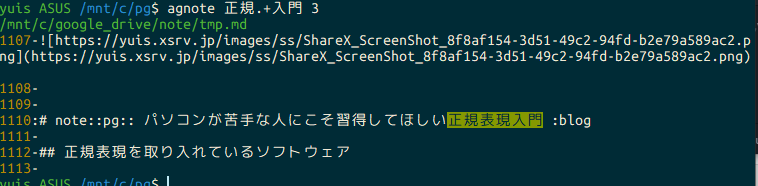
With that in mind, here’s the implementation of a command to search text files in those folders:
agnote ()
{
    ARG2=${2:-0};
    ag -G "^.*\.(md|txt)$" -C ${ARG2} -S "${1}" /mnt/c/google_drive/note/ /mnt/c/note/
}
-G … restrict file by match -C … context; print before and after lines of each match -S … smart case (default)
The second argument specifies the number of lines before and after to output. The first argument is the regex to search for. The rest is as shown.
As an application example, here’s one:
note-getskd(){
  ag -G "^.*\.(md|txt)$" -C "3" -S "\s:(skd|schedule):($(date +%Y)\/)?($(date +%-m/%-d '--date=+0 day')|$(date +%-m/%-d '--date=+1 day')|$(date +%-m/%-d '--date=+2 day')|$(date +%-m/%-d '--date=+3 day')|$(date +%-m/%-d '--date=+4 day')|$(date +%-m/%-d '--date=+5 day')|$(date +%-m/%-d '--date=+6 day'))[?]?(T[0-9]{1,2}:[0-9]{1,2})?[?]?" /mnt/c/google_drive/note/ /mnt/c/note/
}
What this does is search for schedule-related notes in the note files.
I define a single unit separated by # in Markdown as a note or note block, and for example, the following two notes would be schedule-related notes:
# note::Practical driving lesson :skd:5/22T13:00-

...

# note::Return pickup :skd:3/15T13:00

...
: is defined as a tag, and I currently have about 30 of them. :skd is an alias for :schedule. In the hash format of :[key]:[value] or :[key], multiple ones are space-separated. This can also be utilized when doing regex searches in Atom.
What note-getskd does is output schedule-related notes within 7 days from today’s date. It gets a bit complicated with some metaprogramming elements. There might have been better ways to do this.
(Just use Google Calendar, right? I prefer having everything in one place.)
Somehow the note-taking overview got longer than the ag explanation. I’d like to publish a complete explanation of my note-taking method as a series or book when I find the time.