This is about wanting to regex search Chrome’s local storage from Bash.
I usually store various data in local storage via JavaScript. For example, saving Google search queries.
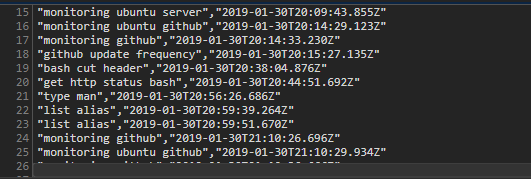
I save time and search queries. Until now, I would save them like this, and back them up with copy-paste when needed or periodically for searching, but I thought it would be convenient if I could directly search the local storage database with regex across the board, so I tried it.
First, local storage files don’t use sqlite format, but use something called LDB (LevelDB).
This has a simple structure consisting only of keys and values, but in reality it’s complex, with keys being strings and values being complex Json format.
yuis ASUS /mnt/c/pg$ file '/mnt/c/pg/_chrome/Default/Local Storage/leveldb/400581.ldb'
/mnt/c/pg/_chrome/Default/Local Storage/leveldb/400581.ldb: DOS executable (COM)
To handle LevelDB, Python’s plyvel seems good.
sudo pip2 install plyvelimport plyvel
db = plyvel.DB('/home/yuis/rsync/leveldb')
for key, value in db:
print('"{0}"\t"{1}"'.format(key, value))
python dev.pyGetting data inside a google Chrome IndexedDB from Bash or Python - Stack Overflow
The ‘/home/yuis/rsync/leveldb’ part is a folder. This format itself seems to be one folder per unit, and individual ldb files cause errors.
Backing up with rsync or something.
rsync -av /mnt/c/Users/ifgm2/AppData/Local/Google/Chrome/User\ Data/Default/Local\ Storage $TMPDIR/Default/So, as shown in the image earlier, there should be some search queries saved, so if I search for them, they should come up.
yuis@yuis:/home/development/tmp$ python dev.py | wc
111827 2318888 162480285
yuis@yuis:/home/development/tmp$ python dev.py | ag "get http status bash" | wc
0       0       0
But they don’t come up.
I tried a few things but they didn’t come up. So probably, it’s compressed by character encoding, encrypted, hex, or anyway it doesn’t retain its original form, so I don’t know where it’s stored and gave up.
If you know, please tell me in the comments.